AJS Furniture
Setting up a media console can transform your home entertainment experience. According to industry expert Sarah Blake, "A well-designed media console is the centerpiece of a great viewing space." This highlights the importance of both aesthetics and functionality when choosing your console.
Choosing the right media console involves more than just style. Consider dimensions that fit your space. You need to think about storage for devices and films. A cluttered area leads to frustration, while an organized setup invites enjoyment.
Balancing design and utility is vital. It’s easy to get distracted by trendy options but find something that suits your taste and needs. Reflect on what will enhance your movie nights. Ultimately, your media console should create a welcoming atmosphere.
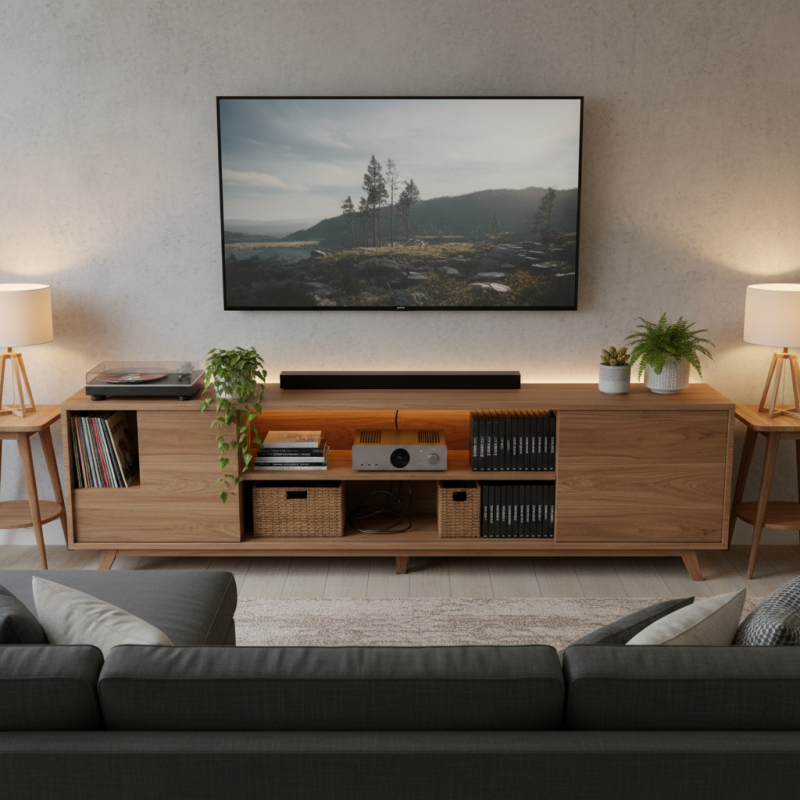
Choosing the right location for your media console is vital for an enjoyable viewing experience. Think about the layout of your room first. A well-placed console can enhance the flow of the space. Don't just shove it in a corner. Instead, consider eye level. Ideally, the screen should be close to your line of sight when seated.
Lighting can make a big difference too. Avoid direct sunlight on your screen. It creates glare, which is distracting. Position your media console away from bright windows. A spot that feels cozy, yet is practical, works best. You want to create an inviting atmosphere. Reflect on what feels comfortable for you and your family.
Consider cable management as well. No one likes a cluttered look. Selecting a location that allows for hidden cables can make your setup look professional. Sometimes, you might feel limited by furniture choices. It's frustrating, but with creativity, solutions exist. Think outside the box. Experiment until you find the perfect spot for your media console, one that feels just right in your home.
When selecting the ideal media console, size is crucial. Start by measuring your space. Ensure the console fits well without crowding.
A wider console can offer more storage but may overpower a small room. On the other hand, a narrow console might seem inadequate for larger spaces.
Consider how much storage you will need for your devices and media. It’s easy to underestimate this.
Style also matters. Decide on a theme that complements your living area. A modern console may contrast with vintage decor, creating visual disharmony. Likewise, color plays a key role.
A dark console can add drama, while lighter tones may open up the space. However, it’s important to ensure your choice aligns with both comfort and practicality.
Ask yourself if the design is truly functional. Worrying about aesthetics often leads to ignoring usability.
Another aspect is the material. Wood, metal, or glass each brings a different feel. Yet, each has its maintenance needs. For instance, glass can be elegant but shows dust easily.
That said, think about how much upkeep you’re willing to commit. Lastly, how will it hold up over time? Reflecting on these details aids in creating a lasting setup.
Setting up a media console can be a fun but challenging task. Begin by assessing your devices. What do you have? Game consoles, DVD players, streaming devices? Make a list. This helps in visualizing your space.
Tips: Use cable organizers to keep cords tidy. Avoid clutter by grouping similar devices together. It simplifies access. Incorporate shelves or baskets for remote controls and accessories. Make it easy to find what you need.
Don’t forget about aesthetics. The console should blend with your room's style. Choose a design that reflects your personality. Personal touches matter. Art pieces or family photos can enhance the setup.
However, things can go wrong. Sometimes, cables still get tangled. Devices may not fit properly. You might need to rearrange several times. Embrace these challenges. It's part of the setup experience. Adjust as needed. Adaptability is key.
Setting up a media console can be a rewarding challenge. The key is effective cable management. A recent survey shows that 73% of users find clutter a primary concern in home entertainment setups. Poor cable management can lead to stress and frustration when trying to enjoy your favorite shows.
Begin by organizing your cables. Consider using cable ties or cord clips. These tools can help keep cables grouped and out of sight. It's essential to plan your routes. Measure lengths to avoid excess cable. According to industry reports, clean setups can enhance user satisfaction by over 40%. Neat appearances allow you to focus on entertainment instead of visual chaos.
Remember to regularly assess your setup. Dust and clutter can accumulate over time. Sometimes, you need to rethink your cable layout. An effective strategy might include investing in low-profile cable management solutions. While aesthetics matter, functionality should not be overlooked. A balance is necessary to create a truly enjoyable viewing experience.
| Component | Recommended Approach | Cable Management Tips |
|---|---|---|
| Television | Mount or place on a stand | Use cable clips to secure wires along the wall |
| Sound System | Set up speakers at optimal locations | Grouping cables with wire ties is essential |
| Gaming Console | Place near the TV for easy access | Label cables to identify connections easily |
| Streaming Device | Connect to HDMI port | Use adhesive cable organizers to avoid tangling |
| Media Console | Select one with sufficient shelving | Keep power cords hidden behind the unit |
Setting up a media console goes beyond just placing your devices neatly. A crucial part is integrating sound systems to enhance your movie nights. Surround sound systems immerse you in audio, but installing them can be tricky. Ensure you properly position speakers. They should complement your seating arrangement, not clash with it. Messy wires can detract from the aesthetic. Try using cable management solutions to keep everything tidy.
Another enhancement is streaming devices. These can expand your content options significantly. However, compatibility issues can arise. Check if your TV supports your streaming device. There are also options for gaming consoles. These need proper ventilation and spacing to function well. Keep in mind that balance is key. Don’t overcomplicate your setup with too many devices. It’s good to reflect on whether you really use everything you install. Simple setups often work best, bringing joy without frustration.
: Consider room layout first. Aim for a spot that enhances flow and comfort.
Ideally, the screen should be at your eye level when seated for optimal viewing.
Avoid direct sunlight on the screen to reduce glare. Choose a cozy, practical spot instead.
Use organizers to hide cables. A tidy look keeps the space professional and clutter-free.
Make a list of devices. Group similar ones together and use baskets for remotes.
Choose a console design that reflects your personality. Add personal touches like art or photos.
Embrace challenges like tangled cables. Rearranging is normal and helps fine-tune your space.
Integrate sound systems for better audio. Position speakers carefully to match your seating arrangement.
Check for compatibility with your TV. Ensure proper ventilation and spacing for gaming consoles too.
Simple setups often provide joy without frustration. Reflect on what you actually use before adding devices.
When setting up a media console for your home entertainment, the first step is choosing the right location. Consider factors like room layout and viewing angles to ensure an optimal setup. Next, selecting the ideal size and style of your media console is crucial; it should complement your living space while providing adequate storage for your devices.
Organizing your media devices and accessories is essential for a tidy appearance. Utilize cable management solutions to keep wires out of sight, which contributes to a clean aesthetic. Lastly, integrating sound systems and other enhancements can significantly elevate your viewing experience, allowing you to fully enjoy your favorite movies and shows. A well-thought-out media console not only serves as a functional aspect of your home entertainment system but also enhances the overall ambiance of your living area.